Turn off AI Overview in Google Search
Google has no switch for AI Overviews, but its Web results page has none. Search from the box below, or make it your default in about a minute.
Last tested: 2026-11-18, all methods working
Make it your default search
Can be set once and forgotten.
- Copy the search address above.
- In Chrome, open the three-dot menu, then Settings > Search engine > Manage search engines and site search.
- Next to Site search, click Add. In the Add site search box, enter Google Web as the Name and noai as the Shortcut, paste the address into URL with %s in place of query, then click Add.
- Next to your new entry, click the three-dot menu and choose Make default.
- Search from the address bar. Results open on the Web tab, with no AI Overview.
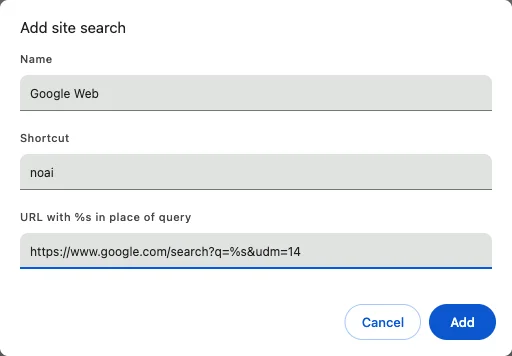
Google notes that in some countries a custom site search cannot be made the default in a Guest profile.
Check it worked
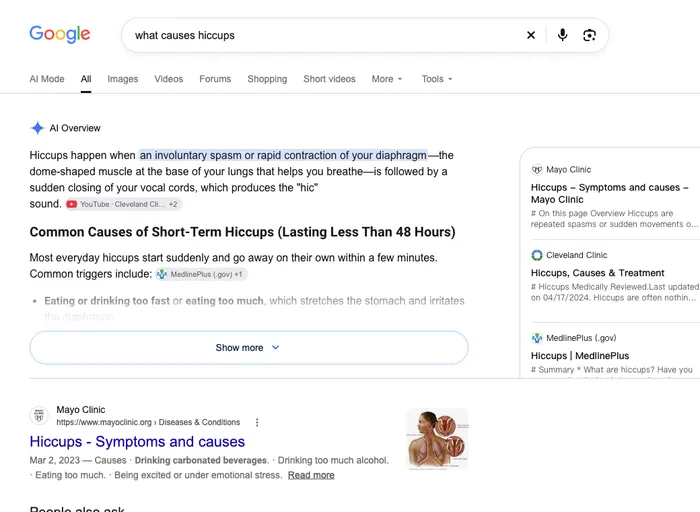
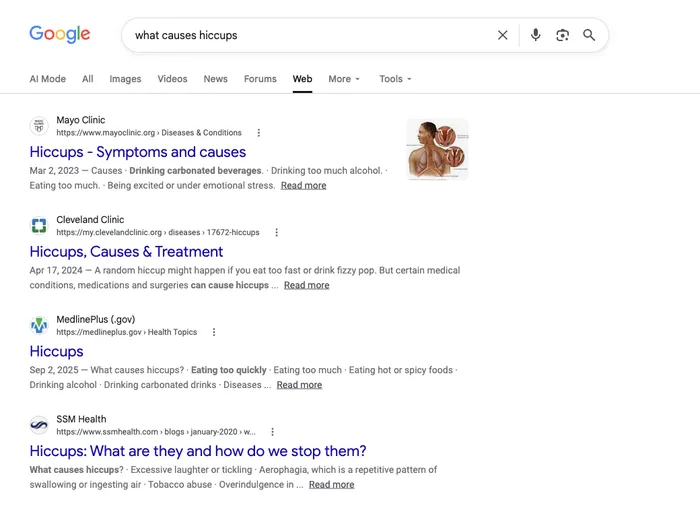
Type what causes hiccups into your address bar and press Enter. If the Web tab is selected and there is no AI Overview at the top, you are done.
See what it should look likeTwo quick fixes that need no setup
Add a minus and a made-up word. Searching what causes hiccups -qzx instead of what causes hiccups showed no AI Overview in our tests. Any nonsense word works, and because no page contains it, nothing is filtered out. Many guides suggest -ai, which also worked for us, but it drops every page that mentions "ai".
Choose the Web filter. After any search, pick Web in the row of filters above the results (it may sit under More). That is the same page this site opens for you, with ten plain links and no AI box.
What changes: before and after
How this works
Google Search has a Web filter that shows only links. Its address ends in udm=14. If your browser sends every search to that address, you never see an AI Overview, without any extension. Read more about what udm=14 is and how long it may last.
Not every browser lets you type in a custom search address. Chrome and Firefox on a computer do. Edge and Chrome on Android pick up search engines from sites you have searched on, which is why this site works as a small search engine of its own: search with it once and it can appear in your browser's list.
Because the Web filter is not an official setting, Google could change it. We run test searches and record the result on our status page, so you can see whether the method still works.
What you give up
The Web results page shows links and nothing else. Besides the AI Overview, you lose featured snippets (the quoted answer box), People also ask, and the image, video and news boxes mixed into normal results. Some readers miss the featured snippets most. When you need those, open the All tab for that one search, or use the Images, Videos and News tabs.
What this does not change
- The AI Mode tab is still there on the Web results page. It only opens if you click it.
- The Google app has no setting for AI Overviews. Use a browser instead.
- Gemini in Gmail, Chrome and Android has separate settings. See how to turn off Gemini.
- On iPhone and Mac, see how to turn off Apple Intelligence.
- In Word, Excel, Outlook and Windows 11, see how to turn off Copilot.
- Other Google features, such as Images, Maps and News, work as before through their own tabs.
FAQ
Can you turn off AI Overview in Google completely?
No. Google does not offer an on/off switch for AI Overviews. Every working method opens Google's Web results instead, a results page that has no AI Overview, or hides the box.
What is the fastest way to remove AI Overview from one search?
Add a minus sign and a made-up word, such as -qzx, to the end of your search, or choose the Web filter above the results. Both remove the AI Overview for that search only.
How do I get rid of AI Overview for every search?
Make Google's Web results your default search engine. In Chrome on a computer you can add the address https://www.google.com/search?q=%s&udm=14 yourself; in Edge and Chrome on Android, search once with the box on this page and pick Turn Off AI as your default.
Does this work on iPhone?
Only partly. Safari cannot use a custom search engine, and Google does not document one for Chrome on iPhone, so the reliable option is to add this page to your Home Screen and search from it, or to pick the Web filter after a search.
What do I lose with the Web results page?
Everything except the links: featured snippets, People also ask, and image, video and news boxes. You can still open Images, Videos or News from the tabs above the results.
Do you see my searches?
No. The search box sends your query straight on to Google with a redirect. We count how many searches pass through, but we do not store or log what you type.
Does this also remove AI Mode?
No. The Web results page still shows the AI Mode tab; it just does not open on its own. See our AI Mode page for what you can and cannot change.